Series: Governing AI Agents in Microsoft 365 — Part 2 of 5. This post covers the Microsoft Purview governance layer — sensitivity labels, DLP for AI responses, Data Security Posture Management, and AI Observability. Part 1 covers Power Platform DLP and environment strategy.
Power Platform DLP policies control what agents can connect to. Microsoft Purview governs how organisational data is protected, monitored, and controlled when used in AI experiences. For organisations with data classification requirements or regulatory obligations, the Purview layer is where agent governance intersects with information protection.
This post covers the main Purview surfaces relevant to agent governance: sensitivity label integration, DLP for AI responses, Data Security Posture Management for AI, and AI Observability.
Sensitivity Labels and Agent Output
Microsoft Purview sensitivity labels integrate with Copilot agent behaviour in two important ways.
The first is label inheritance. Where supported by the workload and output location, content generated from labelled sources can inherit sensitivity labels and associated protections. The exact behaviour depends on where the generated content is created and stored — not all Copilot interactions produce label-bearing output artifacts, and behaviour varies across workloads. The governance principle holds, however: where label inheritance is supported, classification boundaries are more likely to be maintained when agents generate new content from existing sources.
The second is response scoping. Purview DLP policies and sensitivity label controls can be used to restrict how labelled content is processed or surfaced in Copilot experiences, depending on the workload and policy configuration. Content visibility and response generation are not always the same thing — organisations can apply controls that restrict how content participates in AI-generated responses even when access to the underlying content remains unchanged.
The practical governance implication is significant. Organisations with highly classified content can apply controls that reduce the likelihood of that content being incorporated into agent responses, without necessarily removing access entirely. The policy configuration sits in Purview and applies independently of individual agent builder decisions.
Purview DLP for Microsoft 365 Copilot
Beyond sensitivity labels, Purview DLP includes Microsoft 365 Copilot as a dedicated policy location, allowing organisations to apply AI-specific controls alongside existing DLP coverage for workloads such as Exchange, SharePoint, and Teams. Policy locations and supported scopes evolve, so it is worth reviewing current documentation when designing policies.
The key condition is Content contains Sensitivity labels. When a DLP policy with the Microsoft 365 Copilot location uses this condition, items matching the specified labels are restricted from being processed in AI response generation, depending on the workload and policy configuration. The policy is about how Copilot handles content, not just whether users can access it.
For organisations that have invested in a Purview information protection taxonomy — a structured set of sensitivity labels applied consistently across their content — this is where that investment pays dividends for AI governance. The classification work done for compliance and data handling reasons becomes the mechanism that governs how agents interact with that content.
Agent Policy Templates
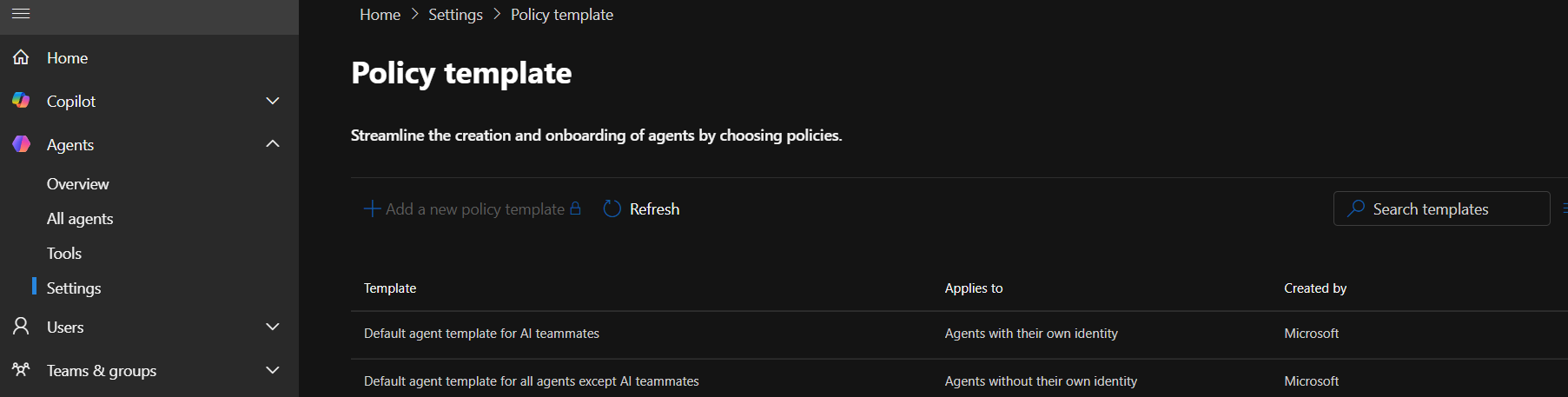
Microsoft has introduced agent-focused policy templates intended to simplify deployment of baseline governance controls across multiple Microsoft control surfaces. These templates reduce the amount of manual configuration required, although the underlying controls still exist across multiple administrative boundaries. Rather than configuring each control surface independently, templates provide a structured starting point.
Currently, Microsoft-defined templates are available. Custom policy templates are on the roadmap. For organisations that want a governance baseline quickly — without building policies from scratch across multiple admin surfaces — templates offer a faster path to a defensible starting point.
The templates approach also has an audit value: applying a named policy template to an agent creates a record of what governance configuration was in place at a given time, which is useful for compliance documentation.
Data Security Posture Management for AI
Data Security Posture Management (DSPM) for AI is Purview's risk-oriented view of AI activity across the tenant. Rather than showing only what controls are in place, it shows what's happening — and flags where the risks are.
DSPM for AI provides:
- Visibility into the depth and breadth of Purview protection coverage across AI apps and agents
- Reporting on high-usage agents and interaction patterns across recent activity windows
- Agent-level data security and compliance policy coverage
- User, prompt, and response activity
- Rate of sensitive prompts and responses
The sensitive interaction rate metric is particularly useful for governance purposes. An agent with a high rate of sensitive content in its interactions is a signal that either the agent's knowledge source scope is too broad, the users interacting with it are working with sensitive content regularly, or both. Either way, it's a prompt for a governance review.
DSPM for AI also surfaces data security risks proactively — not just reporting on what happened, but recommending controls based on observed patterns. For organisations building out their AI governance framework incrementally, DSPM provides the evidence base for prioritising which controls to implement next.
AI Observability and Insider Risk
The AI Observability page in Purview provides a centralised view of agent activity across the organisation, with a risk lens applied through Insider Risk Management integration. Note that AI Observability capabilities may require additional licensing and configuration dependencies — it is worth confirming prerequisites before relying on this surface for governance reporting.
From AI Observability, administrators can:
- Review agents with recent activity, prioritised by risk level determined by Insider Risk Management
- Analyse top risky activity categories: oversharing, potential exfiltration, policy violations, and other risk indicators
- Drill into individual agents to see Entra status, creation date, owner, and agent user ID
- Review the specific risky activities identified from agent interactions
- Access Purview remediation recommendations based on identified risks
The risk prioritisation is meaningful because it focuses attention on the agents that actually warrant investigation rather than requiring administrators to review all agent activity equally. An agent flagged for potential oversharing is a different governance conversation than one with no risk signals.
The Entra status and ownership information visible at the agent level in AI Observability connects the technical risk signal to the human accountability layer — who owns this agent, and can they explain why it's generating these signals?
Activity Explorer
Activity Explorer in Purview captures the detailed record of AI interactions, sitting alongside its existing coverage of document activities, sensitivity label changes, and policy matches. Visibility into AI interactions through Activity Explorer depends on Purview audit being enabled, appropriate licensing being in place, and audit retention periods being configured — confirming these prerequisites is a practical first step before relying on this data for governance or incident response purposes.
For agent governance, Activity Explorer covers:
- AI interactions — prompts and responses across Copilot experiences
- Sensitive information type detections in AI interactions
- AI website visits from agents with public web knowledge sources
Where auditing and licensing prerequisites are met, AI interaction records can be reviewed through Purview investigation experiences. This capability has direct implications for compliance and incident response — if an agent produces an output that raises a concern, the interaction record provides a starting point for investigation.
The combination of Activity Explorer with DSPM and AI Observability gives compliance and security teams three different views of the same underlying activity: the risk posture view (DSPM), the risk-prioritised agent view (AI Observability), and the detailed interaction record (Activity Explorer). Together they cover the monitoring and evidence requirements that regulated organisations will face as AI use becomes subject to the same audit expectations as other data processing activities.
A Note on eDiscovery and Legal Hold
For governance audiences, it is worth flagging that AI interactions — prompts, responses, and agent activity — may fall within scope for eDiscovery and legal hold depending on how your organisation's Purview audit and retention configuration is set up. This is an evolving area: as AI use grows, the question of whether Copilot interaction data is subject to the same preservation obligations as email or document activity will become more pressing. Reviewing your retention and eDiscovery configuration with AI interactions in mind is a worthwhile step, particularly for regulated industries.
What This Layer Doesn't Cover
Purview governs how organisational data is protected, monitored, and controlled in AI experiences. It doesn't control the build and publish layer — that's Power Platform DLP, covered in Part 1. It doesn't provide the control plane for the agent estate — that's Microsoft Agent 365, covered in Part 3.
And like the Power Platform layer, it doesn't address the process layer: Purview can tell you an agent is generating a high rate of sensitive responses, but it can't tell you who is responsible for that agent, whether it was intentionally designed that way, or who should review it. That accountability layer is covered in Part 4.
Where to Start
For organisations reviewing their Purview posture with agents in mind:
- Check whether your sensitivity label taxonomy is applied consistently enough to be useful as a governance mechanism for AI responses — gaps in labelling are gaps in AI content governance
- Review whether a Microsoft 365 Copilot DLP policy is in place and whether it reflects your classification tiers
- Confirm that Purview audit is enabled and AI interaction retention is configured before relying on Activity Explorer for governance purposes
- Enable DSPM for AI and review the initial risk findings — the first report will surface your highest-risk agents and give you a prioritised starting point
- Check the licensing and configuration prerequisites for AI Observability before building it into your governance reporting process
Part 3 of this series covers Microsoft Agent 365 — the control plane for the agent estate, including the centralised registry, agent identity, lifecycle management, and observability.