Add Multiple Document Libraries
This PnP PowerShell script reads a list of library names from a CSV file and bulk creates multiple SharePoint Online document libraries on a target site in a single operation. Each library is added to the Quick Launch navigation automatically.
Purpose
This script helps with document library provisioning by:
- Creating multiple document libraries in one run from a simple CSV
- Adding each new library to the site's Quick Launch navigation
- Eliminating repetitive manual library creation through the UI
- Standardising library naming across sites at scale
Prerequisites
- PnP PowerShell module installed
- Site collection administrator or site owner permissions
- CSV file populated with library names (see format below)
CSV File Format
The script expects a CSV file with a single column:
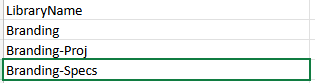
PowerShell Script
# Set Parameters
$SiteURL = "https://tenantName.sharepoint.com/sites/siteName"
$CSVPath = "C:\yourPath\DocumentLibs.csv"

# Connect to PnP Online
Connect-PnPOnline -Url $SiteURL -Interactive

# Read the CSV file
$Libraries = Import-Csv -Path $CSVPath

# Loop through each library name
foreach ($Library in $Libraries) {
    $LibraryName = $Library.LibraryName

    # Create document library
    New-PnPList -Title $LibraryName -Template DocumentLibrary -OnQuickLaunch

    Write-Host "Created library: $LibraryName"
}

Write-Host "Completed"
Usage Notes
- Update
$SiteURLto the target SharePoint site URL - Update
$CSVPathto the location of your CSV file on disk - The CSV must have a column named exactly
LibraryName - Remove
-OnQuickLaunchfrom the script if you don't want libraries added to site navigation - Test with a small CSV before running against a production site