Set List Item by ID
This PnP PowerShell script reads a CSV file containing list item IDs and uses them to target and update specific SharePoint Online list items. It is useful for bulk field updates where you already know the item IDs you want to modify.
Purpose
This script helps with SharePoint list management by:
- Reading item IDs and update values from a CSV file
- Targeting individual list items by their numeric ID
- Updating one or more field values per item in a single operation
- Logging success and failure for each item processed
Prerequisites
- PnP PowerShell module installed
- Site collection administrator or list edit permissions
- A CSV file (e.g.
TaskUpdate.csv) with aTaskIDcolumn containing the list item IDs - The internal field name of the column you wish to update
CSV Format
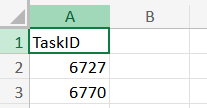
The CSV file should include at minimum a TaskID column matching the SharePoint list item ID. Example:
TaskID
1
5
12
47
PowerShell Script
# Parameters
$ClientId = "<clientId>"
$SiteURL = "https://<tenant>.sharepoint.com/sites/<siteName>"
$ListName = "<listName>"
$CsvFile = "TaskUpdate.csv"

# Connect to SharePoint Online
Connect-PnPOnline -Url $SiteURL -Interactive -ClientId $ClientId

# Import CSV
$Sites = Import-Csv $CsvFile

# Loop through CSV data
foreach ($Site in $Sites) {
    $ListItemId = $Site."TaskID"

    if ($ListItemId) {
        Write-Host "Updating item with List ID: $ListItemId"

        # Prepare field values to update
        $FieldValues = @{"<fieldName>" = "<fieldValue>"}

        try {
            # Update the SharePoint list item
            Set-PnPListItem -List $ListName -Identity $ListItemId -Values $FieldValues
            Write-Host "Item with List ID $ListItemId updated successfully." -ForegroundColor Green
        } catch {
            Write-Host "Error updating item with List ID $ListItemId" -ForegroundColor Red
        }
    } else {
        Write-Host "List ID not found in CSV row."
    }
}

# Disconnect from SharePoint
Disconnect-PnPOnline
Usage Notes
- Replace
<clientId>,<tenant>,<siteName>, and<listName>with your environment values - Replace
<fieldName>with the internal name of the SharePoint column to update (not the display name) - Replace
<fieldValue>with the value to set — use the appropriate type for the column (text, number, date, etc.) - To update multiple fields at once, add additional key-value pairs to the
$FieldValueshashtable - The CSV column header
TaskIDcan be renamed — update the$Site."TaskID"reference in the script to match - Test against a non-production list before running on live data