PnP Multilingual Governance
A single-package SPFx solution that provides tenant-wide translation governance for multilingual SharePoint Online sites. Detects translation drift across registered sites, surfaces it in an interactive dashboard, and sends consolidated nudge notifications to translators — all via Microsoft Graph, with no Azure dependency.
This is the successor to the original PnP PowerShell proof of concept — the same drift detection logic, rebuilt as a proper tenant-wide product with multi-site support, automated email notifications, and a translator-focused workflow.
Architecture
Everything ships in one .sppkg file. No Azure Functions, no Power Automate flows, no external services — all logic runs inside SharePoint via PnP JS and Microsoft Graph, called directly from the web part.
Four components work together:
- Application Customiser — fires on page load and provisions the two required SharePoint lists if they don't already exist. Idempotent and safe to run repeatedly.
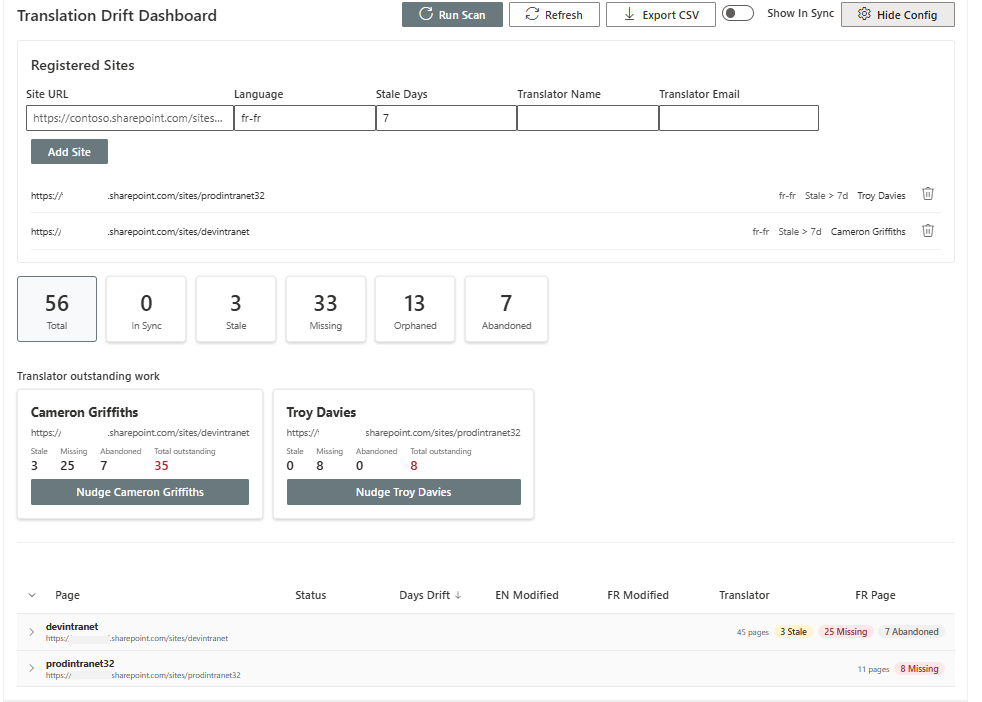
- Dashboard Web Part — the main interface. Summary tiles, a sortable and filterable table grouped by site, a translator panel for sending nudges, and a configuration panel for registering sites.
- Drift Detection Engine — a TypeScript service that scans the Site Pages library on every registered site, matches English source pages to their translations, calculates drift, and writes the results to a SharePoint list. Triggered on demand from the dashboard.
- Notification Service — calls the Microsoft Graph
sendMailAPI directly from the web part to deliver nudge emails, with no flow or backend required.
What It Detects
Each page across every registered site is classified into one of five statuses:
| Status | Meaning |
|---|---|
| In Sync | The translation is current. Includes cases where the translation was updated after its English source. |
| Stale | The English source has been modified more recently than the translation, beyond the configured threshold. |
| Missing | No translation exists for this source page. |
| Abandoned | A translation page exists but was never published — still sitting in draft. |
| Orphaned | A translation page exists but its source page has been deleted. |
The stale threshold is configurable per site in days, so different sites with different translation SLAs can be governed independently.
Cross-Site Governance
Unlike the original proof of concept which scanned a single site, this solution scans every site registered in the configuration list in a single run. Each site can have its own language, stale threshold, and assigned translator.
The dashboard table groups results by site with collapsible headers showing page count and a status breakdown per site, so a tenant-wide view doesn't become unmanageable as more sites are added.
If a registered site is inaccessible — permissions issue, site deleted, or otherwise unreachable — that site is skipped with a warning shown on the dashboard, while the scan continues for every other registered site.

Translator Nudge Notifications
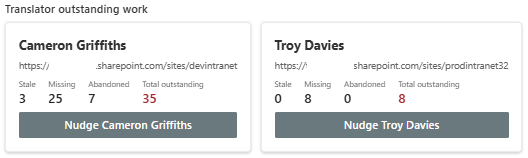
Rather than a notification per page, the dashboard groups outstanding work by translator. Each translator with at least one stale, missing, or abandoned page gets a card showing their name, the site they're responsible for, and a breakdown of outstanding work.
One click on a translator's card sends a single consolidated email listing every page they need to act on — across every site they're responsible for — rather than a flood of individual notifications. The email includes direct links to both the English source and the translated page where one exists.
Prerequisites
- SharePoint Framework development environment (Node.js, Heft toolchain)
- PnP JS (
@pnp/sp,@pnp/core,@pnp/logging) - SharePoint Online tenant with multilingual pages enabled on the sites you want to govern
- Tenant administrator access to deploy the solution and approve Graph API permissions
Permissions Required
The solution requires the following Microsoft Graph permissions, declared in the solution manifest and requiring tenant admin consent on first deployment:
| Permission | Purpose |
|---|---|
Sites.Read.All |
Scan Site Pages libraries across registered sites |
Mail.Send |
Send nudge notification emails to translators |
Admin consent is requested automatically through SharePoint Admin Center → Advanced → API access after the package is deployed to the App Catalog.
Deployment
1. Build the package
npm install
npm run build
This produces the .sppkg file in sharepoint/solution/.
2. Upload to the App Catalog
Upload the .sppkg to your tenant App Catalog. Choose tenant-wide deployment to make the web part available across all sites.
3. Approve API permissions
Go to SharePoint Admin Center → Advanced → API access. Approve the Sites.Read.All and Mail.Send requests that appear after deployment.
4. Add the web part
On any site you want to govern, add the Translation Drift Dashboard web part to a page. The Application Customiser provisions the required lists automatically on first load — no manual list setup needed.
5. Register sites
Open the dashboard, click Manage Sites, and register each site you want to monitor — site URL, language, stale threshold, and translator name and email.
Data Model
Two SharePoint lists are provisioned automatically:
- TranslationDrift — one row per page per language, populated by each scan. Tracks page identification, drift calculation, translator assignment, and nudge history.
- GovernanceConfig — one row per registered site per language. Stores the configuration used to drive each scan — which sites to check, which language, what threshold counts as stale, and who the translator is.
Technical Notes
The drift detection logic in this solution carries forward the key findings from the original PowerShell proof of concept:
_SPTranslationSourceItemId on a translated page contains the UniqueId of its source page — not the GUID field returned by default SharePoint queries. The matching logic explicitly requests UniqueId and uses it as the lookup key.
SharePoint's REST API requires the OData__ prefix for internal fields beginning with an underscore. _SPIsTranslation becomes OData__SPIsTranslation in $select queries — the leading underscore in the field name combines with the OData_ encoding prefix to produce the double underscore.
Folder items in the Site Pages library — used for section navigation — are excluded from drift detection by filtering on the .aspx file extension, since they appear as list items but aren't translatable content pages.
Source
This solution is built on the same diagnostic foundation as the Translation Drift Dashboard proof of concept, extended into a full tenant-wide product.
The complete story of how this was built — including the technical problems solved along the way — is covered in the accompanying blog post.