SharePoint Online's multilingual pages feature handles the mechanics of translation reasonably well. Create a page, add languages, notify your translators, and the framework takes care of linking source pages to their translated counterparts. What it does not handle is the question that comes six months later: are those translations still accurate?
Content changes. Policies get updated. Procedures are revised. A page that was perfectly translated in October may be significantly out of date by March, and unless someone is manually checking the Translation pane on every page, one at a time, there is no way to know. This is translation drift, and it is one of the most common and least visible governance failures in multilingual intranet deployments.
This post covers a translation governance toolkit built to solve that problem. It started as two PnP PowerShell scripts and a single-site dashboard. It has since grown into a full tenant-wide SPFx solution, multi-site scanning, automated translator nudges via Microsoft Graph, and a governance dashboard that scales from one site to an entire intranet, all packaged into a single deployable web part.
What Translation Drift Actually Costs
The immediate cost is obvious, users reading the French version of a page see content that no longer reflects current policy or process. For an intranet that exists to communicate accurate information across a multilingual workforce, that is a fundamental failure of purpose.
The less obvious cost is trust. Once users learn that the French content cannot be relied upon to match the English, they stop using it, and the investment in the multilingual infrastructure becomes difficult to justify. Rebuilding that trust requires not just fixing the stale pages but demonstrating that there is a governance process in place to prevent it happening again.
A translation drift dashboard is both the diagnostic tool and the proof of process. It shows what is stale, who is responsible for fixing it, and, when run regularly, provides the audit trail that demonstrates the translation process is being actively managed.
How SharePoint Links Source Pages to Translations
Before building anything, it helps to understand how SharePoint's multilingual pages feature actually connects source pages to their translations under the hood.
When a translated page is created, SharePoint sets a field called _SPTranslationSourceItemId on the translation page. This field contains the UniqueId of the source page, the internal SharePoint identifier that is distinct from the GUID field returned by standard list queries. The translated page also carries _SPIsTranslation (a boolean confirming it is a translation) and _SPTranslationLanguage (the locale code, for example fr-fr).
This is the link the drift detection logic exploits, whether in the original PowerShell script or the current SPFx solution. By loading all pages from the Site Pages library, separating source pages from translations, and matching them via _SPTranslationSourceItemId against source page UniqueId values, every English page can be reliably paired with its French counterpart, or flagged as missing one.
One important nuance discovered during development: _SPTranslationSourceItemId points to the page's UniqueId, not the GUID field that standard SharePoint queries return by default. These are different values. Both the PowerShell script and the SPFx service explicitly request UniqueId and use it as the matching key.
From Proof of Concept to Product
The first version of this toolkit was three pieces: a PowerShell script to provision a SharePoint list, a second script to scan a single site and calculate drift, and a simple SPFx dashboard to display the results. It proved the concept worked and validated the technical approach, but it only covered one site at a time, required someone to manually run a PowerShell script, and had no way to notify translators beyond looking at the dashboard yourself.
The current version is a single SPFx solution, pnp-multilingual-governance, that does everything inside SharePoint with no PowerShell, no Azure dependency, and no external services. Everything runs through PnP JS and Microsoft Graph, called directly from the web part.
What It Does
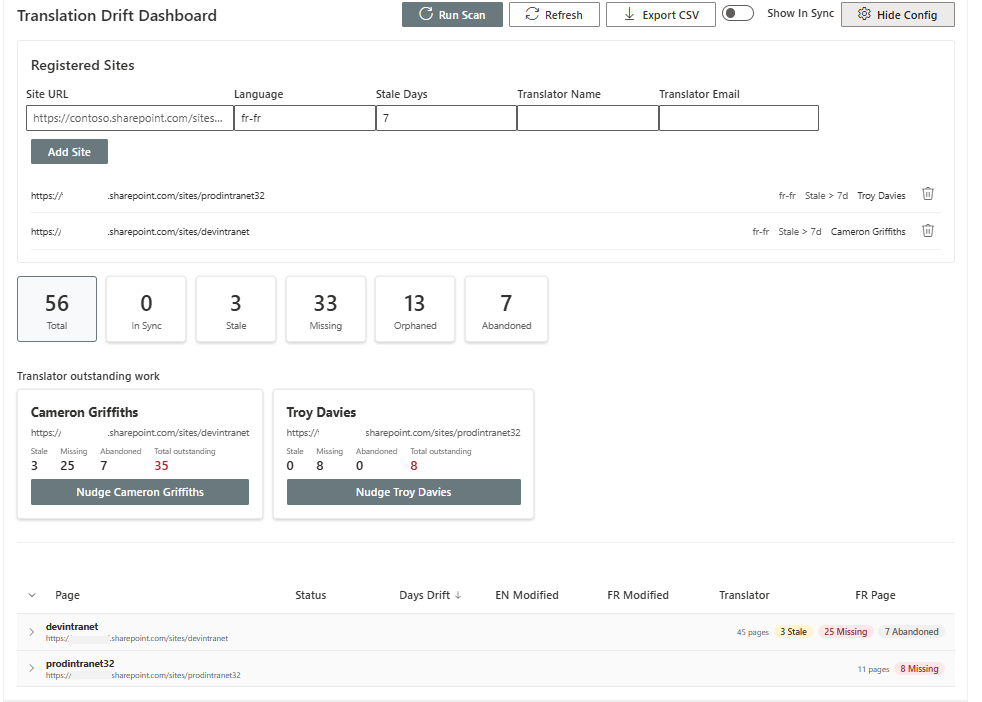
Tenant-wide scanning. Register any number of sites in a configuration panel, each with its own language, translator, and stale threshold. A single scan checks every registered site and brings the results back into one dashboard.
Five-status drift detection, an expansion from the original three:
| Status | Meaning |
|---|---|
| In Sync | Translation is current, including when the French page was updated after its English source, changes are assumed to flow English → French. |
| Stale | The English source has been modified more recently than the translation, beyond the configured threshold. |
| Missing | No translation exists for the source page at all. |
| Abandoned | A translation page exists but was never published, sitting unfinished in draft. |
| Orphaned | A translation page exists but its English source has since been deleted. |
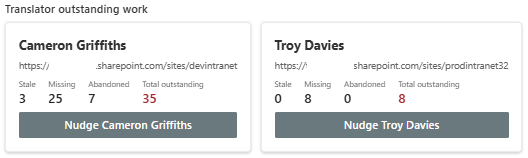
Translator-grouped nudge notifications. Rather than emailing one notification per page, the dashboard groups all outstanding work by translator. Each translator with at least one stale, missing, or abandoned page gets a card showing their name, the site they're responsible for, and a breakdown of outstanding work. One click sends a single consolidated email listing everything that needs attention, across every site that translator is responsible for, with direct links to both the source and translated pages.
Per-site error isolation. If a registered site is inaccessible (permissions issue, site deleted, network problem), the scan logs a warning for that site and continues scanning every other registered site, rather than failing the entire run.
Export to CSV. The currently filtered table can be exported for offline review or reporting up to stakeholders who don't have direct dashboard access.
A Note on Where This Sits
This is one example of where SharePoint governance tooling is heading, and it's worth being honest that the landscape is moving fast. Microsoft's own SharePoint Advanced Management is expanding rapidly into content assessments, agent governance, and site lifecycle management. Copilot Skills may eventually be able to reason over the same _SPTranslationSourceItemId relationships this toolkit relies on and produce similar governance insight conversationally.
For now, this fills a genuine and specific gap, multilingual translation governance, that nothing else addresses natively.